


Since version 2.9 TFU does support that you can include and execute your own code after the upload. In TinyWebGallery
e.g. the cache images are automatically created. You can e.g. write a log file or enter the upload data to your database.
You can also track downloads, deletes or any other file function since TFU 2.10.7. Check the log plugins for working implementations!
On this page you find all available plugins, how to install them and how to create your own plugins.
The plugins do work for TWG, TFU, JFU and WFU.
 Available plugins
| Plugin | Description | Download |
|---|---|---|
| E-mail Version 1.1 |
The e-mail plugin replaces and enhances the internal e-mail notification for an upload. The default e-mail plugin sends an e-mail to the given address with a subject and a body where you can set 2 variables only.
With this plugin this now changes dramatically. You have now 17 variables available you can use in the subject and in the body of the e-mail. The body is now not a simple line anymore but a complete template where you can design text and also html e-mails. You are also able to send a 2nd e-mail to a different e-mail. The default for Joomla is the uploader itself. Please read the readme.txt in the download. It contains the full documentation how the plugin can be configured. |
Download |
| Log Version 1.1 |
The log plugin logs each upload, download and delete to the tfu.log file. For each upload the file name, file path, the full path, the login and the description (if given) is stored. If you use Joomla and a user is registered you additionally get the user id, user name and the user e-mail. Make sure the tfu folder is writeable! Please note: The tfu.log has a maximum filesize of 2 MB. When the limit is reached the file is renamed to tfu.log.bak and a new log file is started. So you have a maximum of 4 MB of log data. If you need more please change the log file size or the implementation in tfu_helper.php (line 53 ff) or use the database plugin. |
Download |
Database log |
The database plugin logs each upload, download and delete to a database table.
For each upload the file name, file path, the full path, the login, upload time and the description (if given) is stored. If you use Joomla and a user is registered you additionally get the user id, user name and the user e-mail.
Please check the debug file after installing the plugin. On some servers the plugin fails because sql.safe_mode is enabled. Please disable this on your server to allow that your database settings are used. | Download |
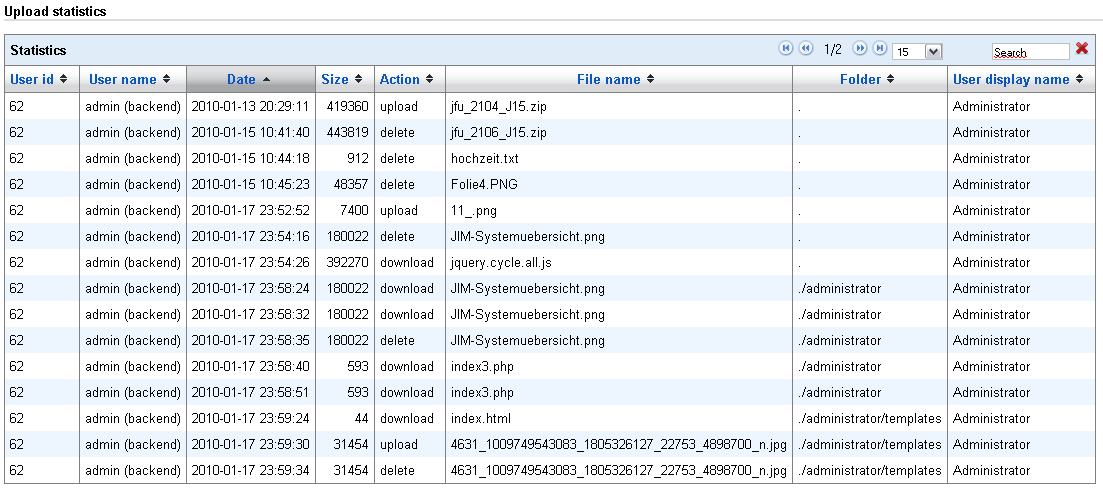
| Database log viewer Version 1.1 |
The database log viewer is an enhancement for JFU 2.11 or newer where you can see the databes log in a nice sortable and pageabble view on the Info/Limits/Register page of JFU.
Setup:
This plugin is for users with a professional edition license or above. | Download |
| Cleanup Version 1.1 |
This plugin deletes files if they are older than x days or if more than y files are in the upload folder. By default the upload dir of the user is used for cleanup. If you use this plugin and you are root be careful! You can cleanup your whole installation! Please edit the parameters in cleanup_plugin.php to configure this plugin. | Download |
| Thumbnail Version 1.0 |
The thumbnail plugin creates a thumbnail after the upload. This plugin creates the thumbnail in the same folder. The file name for the thumb is the original file name plus '.thumb.jpg'. The internal resize function is used in the plugin. Therefore the file is first copied and resized afterwards. | Download |
| Prefix Version 1.0 |
The prefix plugin adds a prefix to each uploaded file. For each upload you can add a timestamp or e.g. the user name added to the file name. Setup:
Please note: The plugin file name is a_prefix_plugin.php. The reason is that this plugin changes the file name and plugins are executed in alphabetical order. This plugin should be executed first because otherwise other plugins use a wrong file name. |
Download |
| Form Version 1.0 |
The form plugin is an example how to get input elements from a HTML page where the flash is included. You can use this plugin with the default tfu.htm page that comes with TFU. There the value of the language drop down is sent with the upload. Make sure the tfu folder is writeable! | Download |
| Move Version 1.0 |
The move plugin moves the uploaded file to a fix folder. The folder can be set in the move_plugin.php in the variable $userdir. | Download |
| Unzip Version 1.0 |
This plugin extracts zip files right after the upload. The requirements for this plugin are PHP 5 >= 5.2.0 or PECL zip >= 1.1.0. You can do the following settings in the unzip_plugin.php:
If your server does not provide the needed classes a message is shown in the log file. |
Download |
| Download Move Version 1.1 |
The download move plugin moves a file after a download or all selected files after a zip download a fix folder. It moves it to the same path as the original below the $archivedir. Empty folders are removed. The folder can be set in the download_move_plugin.php in the variable $archivedir. E-Mail notification can be enabled by using a notification e-mail in the config. | Download |
| Approve Version 1.0 |
By default this plugin moves a file to a subfolder called approve after the upload. This make it possible to do an easy approval process for uploads. So when a users uploads a file e.g. to the folder "upload/user1" it is moved to the sub folder "upload/user1/approve" which is created automatically if possible. In TWG/TFU/JFU you can configure that certain directories (e.g. .svn) not shown. Add the approve directory to the directories that are not shown ($exclude_directories) in TWG/TFU/JFU. In TWG you can use the TWGExplorer to move the files back after approval. In JFU you can use a different profile where the directories are shown. For advanced users: If you like different rights in TWG for the flash uploader I recommend to rename the folder to .approve and add this folder to the $exclude_directories in the additinal tab ($exclude_directories[]='.approve';). In TWG you can set the visibility of hidden files (files starting with a .) individually for each user. Make sure to use the latest version of TWG (at least 1.8.5 preview) because $hide_hidden_files is not connected to the TWGExplorer settings before in the front end. Then you have to edit admin/upload/my_tfu_config.php and set $exclude_directories again but without the .approve folder: At the bottom of my_tfu_config.php you find $exclude_directories[] = 'folder.id'; and change it to $exclude_directories = array('folder.id'); |
Download |
| Download delete Version 1.0 |
The download delete plugin deletes a file or if zip download is enabled all selected files after a download. E-Mail notification can be enabled by using a notification e-mail in the config. | Download |
| Watermark Version 1.0 |
This plugin creates a watermark on each uploaded image. Please set the parameters in the plugin to change the settings. | Download |
Feel free to extend any of the plugins to your needs.
 How to install plugins
Installing a plugin is really simple. Just extract the php file in the zip to the directory where the tfu_upload.php is located:
- TFU - main folder
- JFU - <Joomla main folder>/administrator/components/com_joomla_flash_uploader/tfu (since JFU 2.11: com_jfuploader)
- WFU - <Wordpress main folder>/wp-content/plugins/wordpress-flash-uploader/tfu
Please check the description for the setup you have to do for some plugins. Feel free to extend any of the plugin to your needs.
Don't forget to delete your plugins before you uninstall JFU.
Plugins are executed in alphabetical order! If a plugin depends on other plugins (like the prefix plugin) take this into account if you create your own plugins.
 How to create your own plugins
Creating your own plugin is really simple. The tfu_upload.php looks for all files which end with _plugin.php. If you e.g. want to create a plugin that copies the file with ftp somewhere else a good name for the plugin would be ftp_plugin.php. You should use one of the existing plugins and modify to your needs.
ftp is now the name of the plugin and you can create the following functions depending when you want to do something. At your own functions you have to use the prefix of you plugin for your functions. In the example below ftp is used.
function ftp_plugin_process_upload_file($folder, $fullpath ,$filename) {
// is called after the upload
}
/* optional for file operations before file methods are called */
function ftp_plugin_process_file($action, $fullpath, $folder) {
// is called before the files functions are executed - See tfu_file.php for available actions.
}
/* optional for file operations after file methods are called - available since 2.12 */
function ftp_plugin_after_process_file($action, $fullpath, $folder) {
// is called after the file functions are executed - See tfu_file.php for available actions.
}
Just check the existing plugins as examples. This function is called by tfu_upload.php after the upload or by tfu_file.php. The available parameters are:
- $folder - relative folder the file is uploaded too.
- $fullpath - the full path to the file - use this to copy the file somewhere.
- $filename - the name of the file.
- $action - the performed action - e.g. delete. See tfu_file.php for available actions.
In the session and in the request are some more data you might want to use:
$description = (isset($_GET['description'])) ? $_GET['description'] : '';
If you want to check if this is the last file of the upload use:
if ($remaining == 0) {
// do whatever you want at the last upload
}
If you have a post upload window you get the data here:
If you need a list of the files uploaded in this upload so far:
If you need any of the parameters from the config please use the global statement.
The next 3 values only available if you use Joomla and a user is registered:
$userdisplayname = (isset($_SESSION['TFU_USER_NAME'])) ? $_SESSION['TFU_USER_NAME'] : '';
$useremail = (isset($_SESSION['TFU_USER_EMAIL'])) ? $_SESSION['TFU_USER_EMAIL'] : '';
$isbackend = isset($_SESSION['IS_ADMIN']);
Make sure that each plugin contains this line at the top to make sure noone else can call the plugin:
If you have written a plugin that is maybe useful for others please send it to me. I will include it to this page.


